Generate a transcript from an Instagram video you can access
Answer: For Instagram Reels transcription, save a video you are allowed to use, choose the file below, select the spoken language, and run the generator. You get timestamped text to review and export. It cannot fetch private Instagram posts or repair audio that is missing, badly mixed, or drowned out by music.
⬆
Drop an Instagram video here, or tap to choose a file
MP4, MOV, WEBM, MP3, WAV, M4A
Generated transcript
Review names, numbers, and music-covered lines against the video before publishing or quoting them.
What Instagram Reels transcription does
This tool turns speech in a saved video into an Instagram Reels transcript with timestamps. Use it for a first-pass Instagram reels to text workflow, then check names, numbers, and unclear phrases against the recording. If you want to transcribe Instagram Reels, start with a media file you have permission to use; this page does not import a social-platform link.
What our local test files produced
Test note: These are locally generated synthetic English speech clips, not recordings from Instagram creators or real Reels. The source dialogue and the browser tool's output are both shown so readers can replay and compare them. The clips were run with English selected.
Check the final seconds before exporting
Source script: “Maya: Save the reel as an MP4 file. Leo: Check the last ten seconds before exporting captions.”
Tool output:
[00:00:00.000] Maya, save the reel as an MP4 file.
[00:00:04.000] Leo check The last 10 seconds before exporting captions
Observed difference: The words are recognizable; punctuation, capitalization, and “ten” versus “10” differ. This run does not show a clear substituted content word.
Compare a duration spoken as words
Source script: “Maya: The clip is thirty seconds long. Leo: The exported file is forty-two seconds.”
Tool output:
[00:00:00.000] Maya, the clip is 30 seconds long. Leo,the exported file as 42 seconds
Observed difference: In the second sentence, the source says “is” and the output says “as”; the two scripted turns also appear together in one output segment.
Review a transcript before sharing subtitles
Source script: “Maya: If the file loads, play the final line before sharing the subtitles. Leo: The transcript is a draft, not a final caption.”
Tool output:
[00:00:00.000] Maya, if the file loads. Play The Final Line Before Sharing The Subtitles
[00:00:06.000] Leo; "The transcript is a draft" - not A final caption
Observed difference: The main words remain recognizable, while punctuation and capitalization vary. Replay the audio before treating formatting differences as changes in meaning.
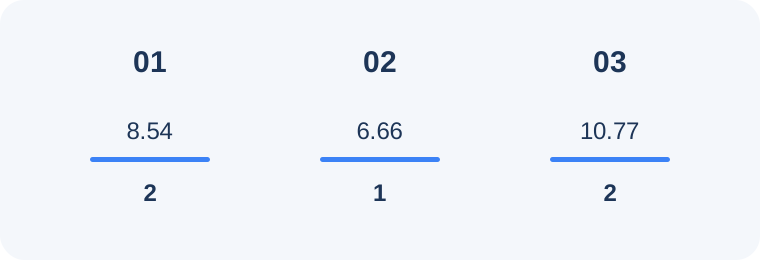
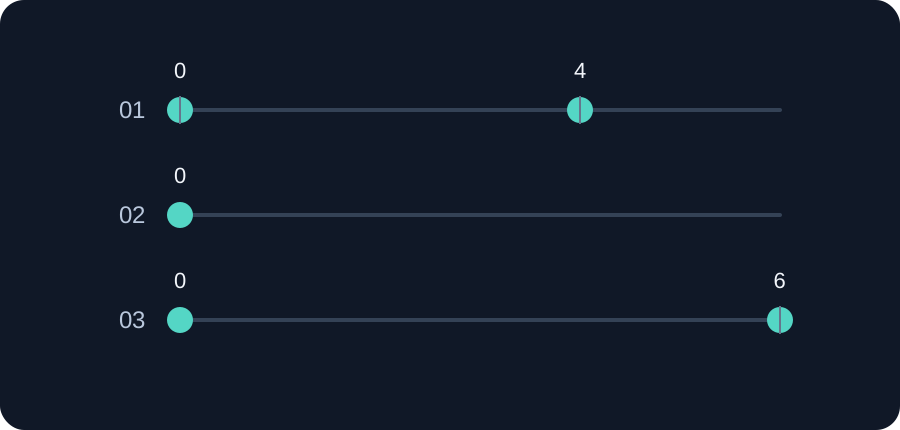
Test file duration in seconds and output segment count, in test order. The graphic reports measurements only; it does not score accuracy.Output timestamp positions, in seconds, as returned in the three test transcripts.
Watch the transcript checks
This short visual recap uses the same three local test runs above. It is a review aid, not a new accuracy measurement.
Instagram Reels subtitles: SRT and VTT
For an Instagram reels subtitles workflow, choose SRT or VTT in the output menu, generate the transcript, then review both the words and timestamps against the video before using the file. TXT and DOCX are also available when you need editable text rather than a subtitle track.
How the browser workflow works
The browser decodes the selected media, breaks the audio into short windows, runs speech recognition on each window, joins the timestamped segments, and formats the result for export. One file is processed at a time in the open tab. The practical limit depends on browser memory, device speed, file duration, and audio complexity; this page does not state a universal maximum file size.
Instagram Reels transcript questions
Why did my Instagram Reels file fail to upload?
If the upload fails, reselect a supported MP4, MOV, WEBM, MP3, WAV, or M4A file and confirm it plays on your device. If the file is rejected, try a shorter or re-encoded copy; if it uploads but returns no transcript, check that it contains an audible speech track. This page does not publish a fixed file-size limit.
Why can an Instagram Reels transcript miss a word?
Speech recognition can substitute a word: in the local synthetic test above, the source says “is” while the output says “as.” Replay the relevant audio, select the spoken language rather than Auto-detect when you know it, and correct the transcript against the source.
Can I make subtitles from an Instagram Reels transcript?
Yes. Choose SRT or VTT before generating, then check the exported subtitle text and timing against the saved video before publishing.