Instagram transcript troubleshooting
Why Instagram Voice Transcription Can Disappear on Mobile
Answer: treat a missing Instagram transcription option as a product or access problem first, not as proof that the audio cannot be transcribed. Check the app version, device permissions, message type, and account rollout; if the option remains unavailable, save an authorized video or audio file and transcribe that local copy.
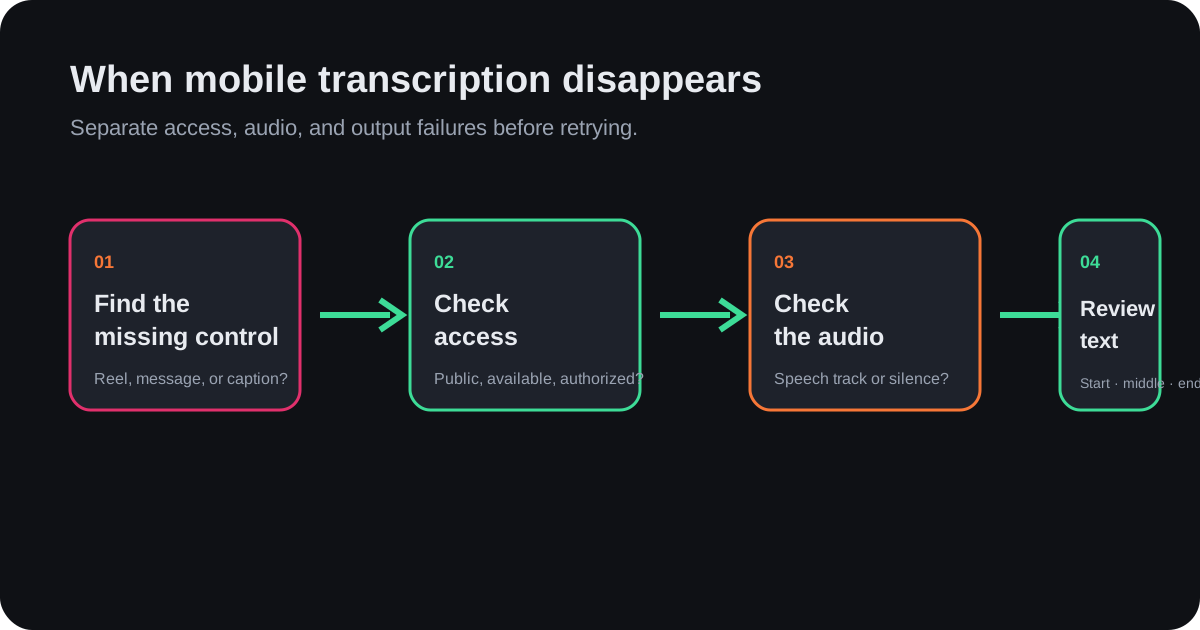
Start by identifying what disappeared
A user in r/Instagram described the symptom directly: “I noticed this morning that I no longer have the option to transcribe voice messages on Android.” That wording matters. The missing control may belong to voice messages, Reels, captions, or an accessibility feature, and each surface can have a different rollout or limitation.
Before troubleshooting, write down the exact surface, device, app version, account, and whether the same item shows the control on another device. This prevents a device-specific change from being mistaken for a transcript-quality failure.
A short mobile checklist
- Update Instagram from the device’s official app store.
- Force-close and reopen the app, then test the same message again.
- Check language, accessibility, microphone, and media permissions without granting unrelated access.
- Test a second message or Reel; one item may lack an audio track or supported format.
- Compare the same account on another device to separate account rollout from local app state.
When the control is still missing
Do not keep retrying the same button and call the result a transcript. Use a copy of media you are authorized to process, then verify the audio locally. A local workflow can produce timestamped text even when an in-app control is unavailable, but it cannot restore access to a private or deleted post.
Review the first, middle, and final transcript segments. If only the opening sentence appears, the problem is incomplete processing rather than a missing mobile button. If the output is empty, distinguish silent audio from a recognizer or decoding failure before exporting.
What not to conclude
- A missing control does not prove that the account has no transcript capability forever.
- A failed voice-message feature does not mean every Reel transcript will fail.
- The post caption is not a substitute for the words spoken in the audio.
- Changing phones can reveal a rollout difference, but it is not a guaranteed fix.
FAQ
Can I transcribe an Instagram video if the app has no button?
Yes, if you have an authorized local media file with usable audio. The transcript workflow then runs on the file rather than on the missing in-app control.
Why does the option appear for one account but not another?
Feature availability can vary by account, app build, device, region, and staged rollout. Compare those variables before treating it as an audio problem.
Should I use the caption as the transcript?
No. The caption is typed post text; a transcript represents spoken audio. Keep them as separate layers when checking what was actually said.