Podcast transcript · reproducible audio checks
Podcast Transcript: Three Reproducible Audio Tests
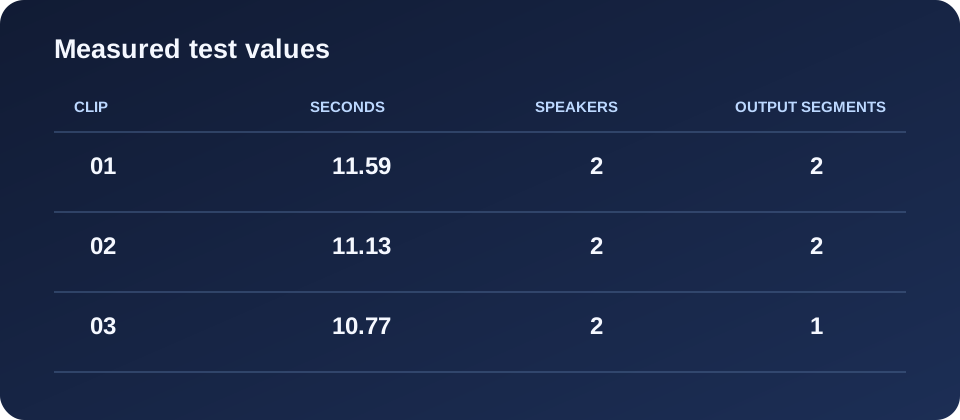
A podcast transcript can be checked against its source audio, but Reelscriptly works here with an audio file on your device—not a Spotify or other podcast link. These three English, two-speaker sample files produced incomplete text when we ran them through the tool with Auto-detect selected.
What these tests are—and are not
Each clip below is a locally synthesized two-voice English dialogue created for this test. The reference dialogue was written before transcription, the WAV clip is playable, and the displayed output is copied from the tool after the run. These are machine-file tests, not tests of Spotify episodes or any particular podcast. The language selector was set to Auto-detect; timestamps shown by the tool start at the beginning of each clip.
To repeat a check, play or download a sample, open the audio-to-text tool, choose the same WAV file, leave Auto-detect selected, and press Transcribe.
Ferry schedule dialogue
Reference dialogue: Speaker 1: “Today Mara is checking the winter ferry schedule. We will leave after lunch and meet everyone at the pier.” Speaker 2: “The boat leaves at fourteen thirty not four thirty. Please bring your paper ticket and a blue coat.”
Reelscriptly output:
[00:00:00.000] Today M R is checking the [00:00:07.000] The boat leaves at 14
Observed error: “Mara” appears as “M R”; the rest of the first speaker’s sentence is absent from the output, and the second line stops after “14” instead of preserving “four thirty” and the remaining sentence.
Recording setup dialogue
Reference dialogue: Speaker 1: “For the recording setup I asked for copper wire. The small microphone should stay on the table.” Speaker 2: “I heard coffee wire at first. We need the cable and not another drink for the studio.”
Reelscriptly output:
[00:00:00.000] for the small [00:00:05.000] I heard of
Observed error: The output omits “copper wire” and most of both turns; the second displayed fragment ends at “I heard of,” rather than the reference sentence “I heard coffee wire at first.”
Garden gate dialogue
Reference dialogue: Speaker 1: “Our next story begins at the garden gate. We planned to open it after six in the evening.” Speaker 2: “Please close the gate before six. The dog will run out when the delivery truck arrives.”
Reelscriptly output:
[00:00:00.000] Our Next Story
Observed error: Only the opening words “Our Next Story” appear; the remainder of the first turn and the entire second turn are missing.
How to read these results
These examples establish only what the tool returned for these exact synthesized files with Auto-detect selected. They do not establish a general accuracy rate, explain why words were omitted, or show how a real podcast episode would transcribe. Compare the playable audio with the output before reusing any name, number or instruction.
Podcast transcript questions
How do I get a transcript of a podcast?
Choose the podcast audio file in the audio-to-text tool, then compare the draft with the recording.
Where can I find a podcast transcript?
Check the episode page or show notes for a published transcript; if one is not available, you can make a draft from an audio file.
Can I download a podcast transcript?
Yes—after transcribing a podcast audio file, you can download the result as TXT, SRT, or VTT.
Unique material on this page: the three playable synthetic source clips paired with their prewritten dialogue and exact Auto-detect outputs, including the visible omissions in each run.
For the tool itself, go to audio to text transcription for a local recording.