Does compressing an MP3 change its SRT subtitles?
Answer: in this tested pair, the smaller MP3 returned the same cue wording apart from capitalization, but different cue times. Both exports still changed “the subtitle file” to “this subtitle file” and contained overlapping cues. A smaller file is not evidence of a corrected transcript.
On October 24, 2026, we ran both encodings in the live audio-to-text tool, selecting English and SRT each time. Both completed with Done — 5 segments. The exports below are actual downloads from those runs, not a renamed copy of yesterday's subtitle result.
The same speech, encoded at two bitrates
The source is the Platform/Cedar synthetic recording used in the overlapping-cue check on the MP3 page: Microsoft Zira Desktop reads both passages with one English voice. This is a new encoding comparison of existing speech, not another independent speaker sample or a real railway announcement. Both MP3 files came from the same original WAV, not by compressing the higher-bitrate MP3 again.
Reference wording: The train leaves from platform thirteen, not thirty. Keep the booking code Cedar eight. Do not change the subtitle timing yet. I heard platform thirteen. I will check Cedar eight against the recording before saving the subtitle file.
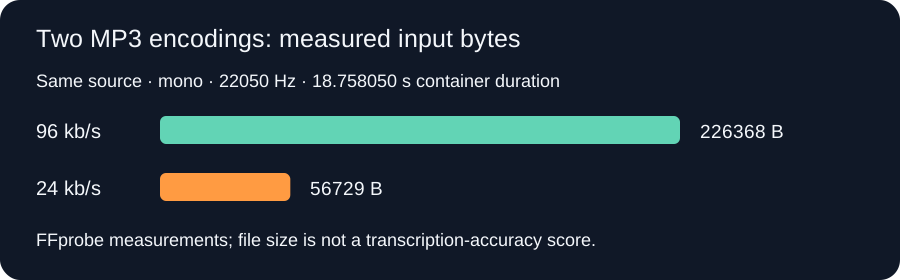
FFprobe identified both files as mono MP3 at 22050 Hz, with an 18.758050-second container duration. The 96 kb/s file contains 226368 bytes; the 24 kb/s file contains 56729 bytes. The difference is 226368 − 56729 = 169639 bytes. These are measurements of the supplied files, not a published upload limit or a speech-accuracy score.
96 kb/s: actual MP3 and raw SRT
Download the 96 kb/s MP3 · Download today's uncorrected 96 kb/s SRT
1
00:00:00,000 --> 00:00:04,639
The train leaves from platform 13, not 30.

2
00:00:04,719 --> 00:00:07,440
Keep the booking code Cedar 8

3
00:00:07,519 --> 00:00:10,880
Do Not Change This Subtitle Timing Yet

4
00:00:10,960 --> 00:00:13,679
I heard Platform 13

5
00:00:13,000 --> 00:00:18,000
I will check Cedar 8 against the recording before saving this subtitle file.
24 kb/s: actual MP3 and raw SRT
Download the 24 kb/s MP3 · Download the uncorrected 24 kb/s SRT
1
00:00:00,000 --> 00:00:04,599
The train leaves from platform 13, not 30.

2
00:00:04,620 --> 00:00:07,419
Keep the booking code Cedar 8

3
00:00:07,440 --> 00:00:10,820
Do NOT change this subtitle timing yet

4
00:00:10,839 --> 00:00:13,660
I heard Platform 13

5
00:00:13,000 --> 00:00:18,000
I will check Cedar 8 against the recording before saving this subtitle file.
What changed, and what did not?
| Check | 96 kb/s run | 24 kb/s run |
|---|---|---|
| First cue ends | 00:00:04,639 | 00:00:04,599 |
| Second cue begins | 00:00:04,719 | 00:00:04,620 |
| Third cue text | Do Not Change This Subtitle Timing Yet | Do NOT change this subtitle timing yet |
| Fourth cue ends | 00:00:13,679 | 00:00:13,660 |
| Fifth cue begins | 00:00:13,000 | 00:00:13,000 |
| Cue-four/five intersection | 13.679 − 13.000 = 0.679 s | 13.660 − 13.000 = 0.660 s |
The “thirteen, not thirty” contrast appears as “13, not 30” in both files. “Cedar eight” appears as “Cedar 8”. The spoken “the subtitle timing” becomes “This Subtitle Timing” or “this subtitle timing”, and “the subtitle file” becomes “this subtitle file”. The smaller file did not repair these wording differences. All cue wording matches when capitalization is ignored; the time boundaries do not. These are separate checks, not interchangeable meanings of “the same transcript”.
Should I compress my MP3 before making SRT?
Keep the original and treat a smaller encoding as a separate input to review, not as an automatic repair. If you make a compressed copy, transcribe that actual copy, preserve its raw SRT, and compare names, numbers, and cue boundaries against the recording. This pair shows that equal cue counts and matching words do not guarantee equal timing.
We ran each encoding successfully once for this comparison. That does not isolate every possible source of model variation, prove that either bitrate is more accurate, or establish a recommended bitrate for other recordings, music, accents, or long files. No universal size limit, processing-speed gain, or best-quality setting was measured here.
What you can reproduce: download both playable encodings, select English and SRT in the tool, then compare the two unchanged exports. The measured input sizes, exact returned cues, and retained wording and timing problems are the evidence for this article; they are not a general accuracy benchmark.
By ReelScriptly · Last content update: