SUBTITLE FILE CONVERTER
SRT to VTT converter
Convert an SRT file to VTT by choosing the subtitle file, selecting VTT, and downloading the converted text; choose SRT to convert VTT to SRT in the same tool.
Files are read locally in this browser. No audio, transcription model, account, or file upload to a server is needed.
Convert SRT to VTT without transcribing again
An SRT file already contains subtitle words and cue times. This SRT converter adds the WEBVTT header, changes the timestamp millisecond separator from a comma to a period, and omits cue numbers. It does not recognize speech again or correct misspelled words.
Convert VTT to SRT in the same tool
Choose your VTT file, select SRT, and press Convert subtitles. The export removes the WEBVTT header and writes sequential SRT cue numbers with comma-separated milliseconds. Cue text, line breaks, and start/end times are retained for supported cues; cue identifiers are omitted or renumbered. Output uses UTF-8 and LF line endings.
A real file round trip you can repeat
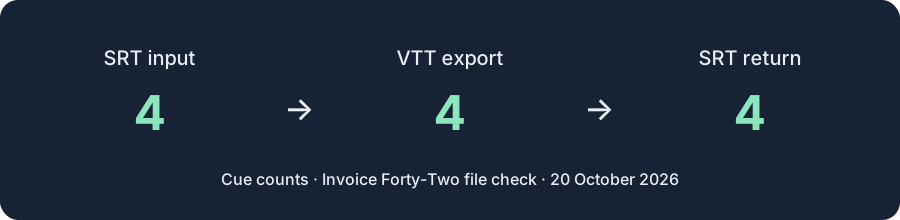
The input is the actual SRT downloaded from our MP4 speech test. Its recognition errors are intentionally unchanged. It contains four cues. You can download the exact input, convert it here, and compare the output with the recorded export.
Download the real SRT input · Download the converted VTT · Download the SRT converted back from VTT
VTT returned from this SRT file:
WEBVTT

00:00:00.000 --> 00:00:03.839
My export is named in Voice42. Keep the comma after

00:00:03.859 --> 00:00:06.500
The name, then say 1 SRT file

00:00:06.519 --> 00:00:08.320
Not a VTT file

00:00:08.339 --> 00:00:11.339
2nd sentence starts at 12 seconds
The four returned cues keep the source text, including “in Voice42” and “say.” Converting the VTT back to SRT reproduced the input cue text and timestamps exactly. This checks format conversion for this file, not transcription accuracy or compatibility with every subtitle editor.
What this converter preserves and rejects
It supports timed UTF-8 SRT and WebVTT cues, multiline text, and simple bold, italic, or underline tags. It preserves overlapping cue times without trying to fix them. Blank or invalid files produce no download.
WebVTT STYLE/REGION blocks, positioning settings, voice/class annotations, and inline timestamp markup are blocked because SRT cannot preserve them here. Remove those features in a copy before converting. NOTE blocks are omitted and counted in the status message. Keep the original when you need those comments or layout features.
The file-size guard is 5 MiB. A successful small-file check does not promise that every file near that limit will perform equally on every phone.
Ebby, HappyScribe, GoTranscript: what changes in the conversion workflow?
For a plain subtitle file, free conversion is not unique to this page. The useful differences are where the file goes, what stands between conversion and download, and whether you can inspect the exact output. We checked these public tools on October 20, 2026, using the same downloadable SRT above and its VTT export. A published reverse-conversion option is not the same as a completed reverse test.
| Tool | Login and cost | Both directions? | What happened with our file |
|---|---|---|---|
| Ebby | The converter says free and no signup. Our SRT download required neither a login nor payment. | SRT to VTT and a separate VTT to SRT form are offered. The reverse download was not verified in this check. | SRT to VTT downloaded successfully. Its VTT used shorter minute:second timestamps and retained the four cue texts. A reCAPTCHA quota warning was visible, but did not prevent that successful download; it is not evidence that the converter is broken. |
| HappyScribe | The converter is advertised as free. Our forward test reached a download without a login or payment. | Separate SRT to VTT and VTT to SRT forms are offered. A reverse download was not verified here. | The uploaded SRT reached “Your file is ready!” and then “Watch a short ad to download”. After that step, a VTT downloaded with all four cue texts. Its instructions say the file is uploaded to its server for conversion. The ad step is a workflow difference, not proof of a paid conversion fee. |
| GoTranscript | The conversion page advertises a free tool without registration. No login or payment prompt appeared in our attempted submission. | The form offers both SubRip (.srt) and WebVTT (.vtt) outputs. Neither direction has a verified download in this check. | The SRT appeared under Attached file(s). After selecting WebVTT and pressing Convert, the button became disabled; we did not obtain a converted file during this check. This records an incomplete attempt, not a claim that the service cannot convert. Its illustrated upload/select/get-files steps do not prove that a download completed. |
| Reelscriptly, this page | Free, no account, no ad-unlock step. | Both directions use the selector above. The exact SRT, VTT, and returned SRT from our completed round trip are linked above. | Conversion runs locally in your browser, without sending the subtitle file to a conversion server. You can preview and copy the returned text before downloading. Unsupported WebVTT layout features are rejected rather than presented as a successful lossless conversion. |
Choose this page when you want a local conversion with visible output and a repeatable round trip. Do not choose it on the assumption that the other tools all charge, require login, or lack a reverse converter: our checks do not support those claims. The downloadable example proves this plain-file workflow, not every subtitle feature or every browser.
Why does my SRT say to save as UTF-8?
Choose a UTF-8 copy of the subtitle file before converting. SRT files do not declare a single mandatory character encoding; this converter reads UTF-8 and rejects bytes it cannot decode rather than exporting damaged text.
On November 3, 2026, we tested the same one-cue subtitle text in two separately saved files. The first used Windows-1252 encoding for the word “café”; the converter returned Save the subtitle file as UTF-8 and try again. with no subtitle output and disabled download. The second used UTF-8. It returned Converted 1 cues from SRT to VTT. Text and cue times preserved. Cue identifiers are omitted or renumbered. and displayed:
WEBVTT

00:00:01.000 --> 00:00:02.000
café
Download the Windows-1252 test SRT · Download the UTF-8 test SRT
To fix your own file, open a copy in a text editor that lets you select its current encoding, confirm the words look correct, and save a separate UTF-8 copy. Select that copy in the converter and compare its output with the original; saving text that already looks wrong will not restore missing characters. This check covers these two small files and the displayed output; we did not download the converted file during this test.
For background on SRT encoding, see the Library of Congress format description.
Questions about SRT and VTT conversion
How do I convert SRT to VTT?
Choose the SRT file, select VTT, press Convert subtitles, then download the previewed VTT file. Confirm that it begins with WEBVTT and check the first and last cue times.
Can I convert VTT to SRT without losing the words?
Yes, supported plain subtitle cues retain their words and times; WebVTT-specific layout or markup is blocked rather than silently discarded. Select SRT as the output and inspect the numbered cue blocks before using the download.
Will converting subtitles fix the wrong words?
No. The converter changes the subtitle format and leaves cue wording unchanged, so correct recognition errors against the original recording separately.
If you have a recording rather than a subtitle file, use audio to text, MP3 to text, or the speech subtitle generator first.
By ReelScriptly · Last content update: