MP4 TO SRT
MP4 to SRT: create a timed subtitle draft
Choose an MP4 with speech, select its language, and download a separate SRT draft; replay the video to check its words and timing before using it.
Open the audio and video transcription tool, choose your MP4, select English or another available language, choose SRT, then press Transcribe. Processing is in your browser. Model loading and device memory can affect whether a particular file finishes.
One MP4 test: a name changed in the result
This input is newly generated synthetic English speech, not a recording of a real person; real voices and other files may produce different results.
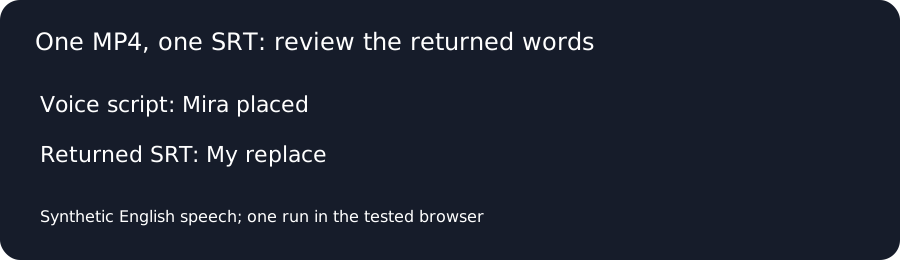
We generated an English voice on this computer and combined it with a plain video image. The test file contains H.264 video and AAC audio, with a container duration of 8.811973 seconds measured using FFprobe. This is not a real conversation or a measure of accuracy for other files.
Text used to generate the speech: Mira placed the amber lantern near platform nine. Bring the green folder before seven, not eleven.
Open the test MP4 or play its audio here:
We selected the file in the live audio-to-text tool, selected English and SRT, and clicked Transcribe. It displayed Done — 2 segments. This is the complete unchanged downloaded SRT:
1
00:00:00,000 --> 00:00:04,000
My replace the amber lantern near platform 9.

2
00:00:04,400 --> 00:00:08,380
Bring green folder before 7, not 11
The returned first cue says “My replace” where the voice-generation script says “Mira placed”; the second cue omits “the” before “green folder”. The digits correspond to the spoken numbers in the script. Cue times are the tool's output and have not been independently checked against word boundaries.
Check the result before using it
Listen to uncertain names, short words and numbers against the video. Download the SRT and edit a separate copy in a subtitle editor if needed. This site produces a separate subtitle file; it does not burn subtitles into an MP4 or extract an already embedded subtitle track. When a video has more than one audio track, the tested interface does not offer an audio-track selector; see the limited two-audio-track check.
What other MP4-to-SRT pages show
On November 10, 2026, we read three pages in the English/US Google results. Zamzar shows a file chooser, SRT output and a speech-language setting. Transcriptly describes uploading, reviewing text and exporting SRT. AudioScribe describes selecting an MP4, generating subtitles and downloading a result. The descriptions above are followed by a same-file check, not an accuracy ranking.
Same MP4, four subtitle outputs
On November 10, 2026, we submitted the same synthetic English MP4 to the three services listed above and downloaded each SRT. This site was run with English selected; Zamzar was set to English. Transcriptly and AudioScribe were tested through their upload flows without an explicit language selection. The reference is the script used to synthesize this voice, not a human recording. One short file does not predict how any tool will perform on other voices or recordings.
| Source | Reference: Mira placed | Reference: the green folder | Original output |
|---|---|---|---|
| Reelscriptly | My replace | green folder | Download SRT |
| Zamzar | Myra placed | the green folder | Download SRT |
| Transcriptly | Myra placed | the green folder | Download SRT |
| AudioScribe | Myra placed | the green folder | Download SRT |
All three competitor outputs spell the reference name as “Myra”; the Reelscriptly output writes “My replace” and omits “the” before “green folder”. Zamzar also writes “Ember Lantern” where the script says “amber lantern”. The exported files retain their own timestamps and punctuation.
Questions about MP4 to SRT
Does this create a new MP4 with captions burned in?
No. The tested workflow returns a separate SRT file.
Did this test reproduce every word in the voice script?
No. It changed “Mira placed” and omitted “the” before “green folder”.
Does one synthetic test predict every MP4 result?
No. Other voices, audio quality, files and browsers can produce different results.
For an MP3, see MP3 to SRT. To convert a subtitle file you already have, use SRT to VTT and VTT to SRT.
By ReelScriptly · Last content update: